Set up with USB
By Dan Jenkins on 5 November 2026
BeginnerUSB setup needs a computer with Google Chrome or Microsoft Edge and a USB-C port. It does not work on iPhone or iPad.
- Plug the board into your computer with the USB-C cable.
- On dottieboards.com create an account if you need to, choose Connect new board and then USB.
- A browser popup lists your board. Original (legacy RNLI) boards appear as "Board in FS mode". Choose it and click Connect.
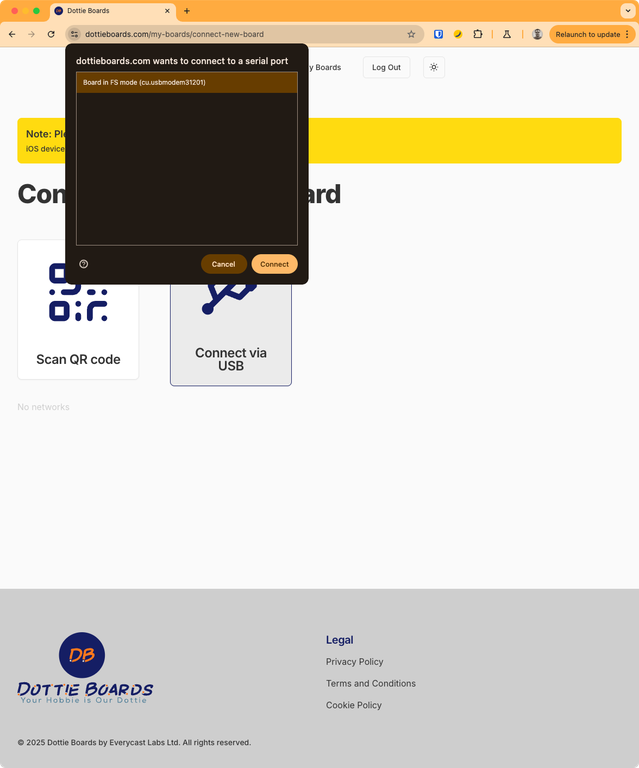
- A form lists all the WiFi networks in the area. Select your network and enter its password.
- The board restarts. Power-cycle it (unplug it and plug it back in) once so it starts cleanly, then enter the code it displays where the website says Connect with a code.
Important: Your WiFi password is never sent to our servers. It goes directly to the board.
Not working?
Try a different USB cable (some cables only charge), and make sure you are using Chrome or Edge. Safari and Firefox cannot do USB setup. iPhone and iPad users: use the board's own WiFi.
Was this article helpful?
No comments yet. Login to start a new discussion Start a new discussion